
How this comes up in practice
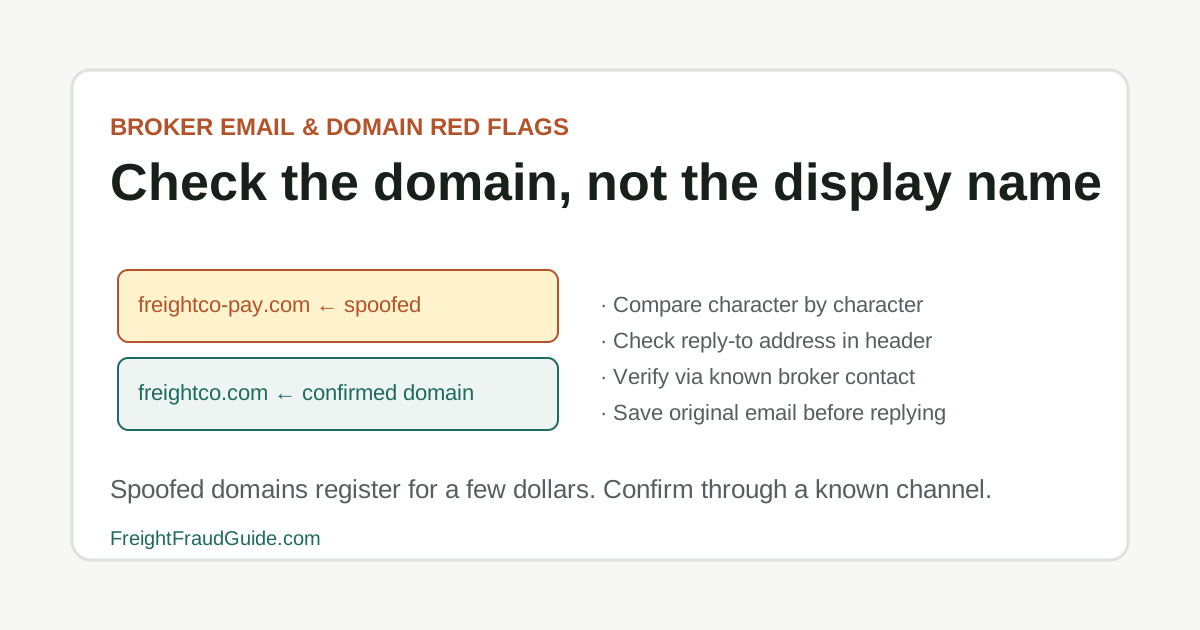
A payment instruction arrives from a party the carrier has worked with for two years. The email is addressed correctly, the sender's name is familiar, and the message asks for updated remittance details before the next payment cycle. The carrier's dispatcher enters the new banking information. Three weeks later, the broker's accounting department calls asking why four invoices went unpaid. The sending domain on the original email was one character different from the broker's actual domain — a hyphen inserted in a compound name — but the display name showed the broker's full company name as expected. The dispatcher had never compared the domain character by character against a previously confirmed source, because the email had always looked right before. A domain lookalike doesn't require any error on the recipient's part — it requires only that they read the display name rather than the underlying address. The check: comparing the full sending address against a saved email from a confirmed prior source takes under ten seconds and catches this substitution before any account information is updated.
Why domain lookalikes succeed within normal transaction patterns
A domain lookalike doesn't require the recipient to do anything unusual. It arrives in the context of a normal transaction, at a normal time, from a sender whose display name matches the expected broker or carrier. The only difference is one or two characters in the actual domain — which most people don't read when they're processing high volumes of email across an active day. For adjacent verification steps, compare this with Email Spoofing in Load Boards, Broker Email and Domain Red Flags, and Fake Load Posting Checklist.
The registration of a lookalike domain costs a few dollars and requires no technical skill. A fraudster can use publicly available information about the legitimate company — its name, its freight lanes, its typical communication format — to create a message that blends into normal transaction traffic. The email looks professional because it's built from professional source material.
The checklist habit this guide builds is specifically the domain-level comparison: checking the full sending address, character by character, against the company's known domain from a previously confirmed source. This takes under ten seconds, catches most substitution variants, and doesn't require any tools beyond reading the sender field. The cases where it matters are the cases where nothing else in the email would have flagged the problem.
Key Takeaways
- Treat the load board post as a lead, not as verification.
- Confirm the broker or carrier identity through official and independently known records.
- Review the email domain, rate, pickup timing, and packet request before sending documents.
- Save screenshots of the posting and all messages before details disappear or change.
Checking domains for lookalike substitutions before acting on a message
Domain lookalikes are the entry point for a significant share of freight email fraud. The attack requires no technical skill beyond registering a plausible domain. It works because transaction volume is high and a slightly wrong domain isn't obvious to someone processing multiple load confirmations in a busy day.
The most effective check is also the simplest: compare the sending domain character by character against the broker or carrier domain you confirmed through an independent source before this transaction. This takes a few seconds and catches most lookalike variations before any documents, pickup details, or payment instructions are exchanged.
Checking domains for lookalike substitutions before acting on a message checklist
- Whether the sending domain matches the domain on file from an independently confirmed source
- Whether any hyphen, dot, number substitution, or transposed letters are present that weren't there before
- Whether the top-level domain changed — .com to .net, .com to .co, or .com to a country-code variant
- Whether a web search for the domain returns the expected company or a newly created lookalike page
- Whether suspicious emails have been preserved in full, with headers, for potential IC3 reporting
Records to check when a domain substitution is possible
Load board review treats the post as a lead that still needs identity verification. In this guide, that starts with misspellings, extra words, changed top-level domains, and deceptive login pages.
Capture the account, posting details, rate, lane, domain, and packet request before the post is edited or removed. Keep the question practical: what changed, who introduced it, and which dated record can be saved before anyone acts on it.
Records to check when a domain substitution is possible checklist
- Treat the load board post as a lead, not as verification.
- Confirm the broker or carrier identity through official and independently known records.
- Review the email domain, rate, pickup timing, and packet request before sending documents.
- Save screenshots of the posting and all messages before details disappear or change.
What to save from a suspected lookalike domain email
For domain lookalike checklist, the useful record is usually the one that shows where misspellings, extra words, changed top-level domains, and deceptive login pages first entered the file.
That record is stronger when it sits beside the dated lookup, the original message, and a note from the posting account owner or independently confirmed company contact. It is weaker when it has been renamed, cropped, forwarded without headers, or separated from the transaction timeline.
What to save from a suspected lookalike domain email checklist
- Record the name, number, document field, contact path, or instruction tied to misspellings, extra words, changed top-level domains, and deceptive login pages.
- Keep the original file or message before saving a marked-up copy.
- Add the source URL, access date, sender identity, and who confirmed or contradicted the detail.
Questions that identify a substitution before a reply or document goes out
Hold the booking, dispatch, pickup, or payment decision when the file depends on a new contact path, revised document, missing official record, or mismatch that no one has explained.
The pause should be narrow and written down: the field that does not line up, the source used to check it, and the person or channel that must answer before the work continues.
Questions that identify a substitution before a reply or document goes out checklist
- Name the exact field or instruction that does not line up.
- Save the document version or message that introduced the mismatch.
- Check the official or independently known source before using the new detail.
- Record the confirmation result before continuing.
What a professional message format and matching content don't confirm
Save screenshots early because load board details and message threads can disappear after the other party changes course. In this guide, that starts with misspellings, extra words, changed top-level domains, and deceptive login pages.
The useful file shows how the posting identity connected, or failed to connect, to the broker or carrier records behind it. Keep the question practical: what changed, who introduced it, and which dated record can be saved before anyone acts on it.
What a professional message format and matching content don't confirm checklist
- Load board posting screenshot
- Profile or account details
- Message thread and email headers when available
- Rate confirmation and packet request
- Official broker or carrier lookup results
When a domain mismatch requires pausing before any response is sent
Load board questions should verify the party behind the account before documents or pickup details are shared. In this guide, that starts with misspellings, extra words, changed top-level domains, and deceptive login pages.
A strong answer comes through a known company contact, not through the same profile that created the concern. Keep the question practical: what changed, who introduced it, and which dated record can be saved before anyone acts on it.
When a domain mismatch requires pausing before any response is sent checklist
- Who controls the posting account?
- Does the email domain match the known company domain?
- Can the broker or carrier confirm the posting independently?
- Why is the rate, timing, or packet request unusual?
Further context on domain lookalike review
A marketplace profile can be compromised or reused. Treat reputation signals as context, not identity proof. In this guide, that starts with misspellings, extra words, changed top-level domains, and deceptive login pages.
When a posting feels unusually urgent or generous, slow down enough to preserve the evidence and verify the entity. Keep the question practical: what changed, who introduced it, and which dated record can be saved before anyone acts on it.
Further context on domain lookalike review checklist
- Do not assume a load board account proves identity.
- Do not send packet documents before confirmation.
- Do not assume a high rate is harmless.
- Do not move to a new thread without preserving the original.
When the posting warrants a report
Escalate when the posting identity cannot be confirmed or when the account appears to be part of spoofing, phishing, or identity misuse. In this guide, that starts with misspellings, extra words, changed top-level domains, and deceptive login pages.
Use platform reporting, known company contacts, IC3, FTC, or FMCSA resources according to the facts and the records you saved. Keep the question practical: what changed, who introduced it, and which dated record can be saved before anyone acts on it.
When the posting warrants a report checklist
- The account contact denies a call-back through known records.
- The domain or payment path changes unexpectedly.
- The post requests sensitive packet details before verification.
- The pattern suggests account takeover, spoofing, or identity misuse.
Source Notes
Source context for Domain Lookalike Checklist
For load-board scam topics, FMCSA L&I confirms broker authority and entity identity behind a posting. SAFER confirms carrier status. FBI IC3 handles cyber-enabled fraud including email spoofing, account takeovers, and domain lookalike schemes targeting load board users. Load board platform verification is a starting point — not a substitute for independent official-record checks.
FAQ
What should I do after spotting a suspicious domain?
Screenshot the full email including the sender address bar and save it in full format with headers. Do not click any links. If a payment was already made or credentials entered, contact your bank and IT security immediately. Report to IC3 if payment redirection was involved.
What should I do immediately if I've already clicked a link in a suspicious freight email?
If the link led to a login page and you entered credentials, reset those credentials on the legitimate platform immediately and contact your IT or security team. If it was a document download, treat the device as potentially compromised and follow your organization's incident response process. Report to IC3 if payment information or freight documents were involved.
How do I find a broker's legitimate domain if I've never confirmed it before?
Check the broker's SAFER record for a company website. Then search the company name directly in a browser and compare the URL in the address bar — not a search result snippet — against what appears in the email. A search result can be manipulated; the SAFER record and the actual website URL are the more reliable sources.
Source References
- Fraud Alerts Federal Motor Carrier Safety Administration. primary source. Last checked 2026-06-04. FMCSA alert page for phishing attempts, spoofed portals, fake notices, SAFER impersonation, and registration-related scams.
- Internet Crime Complaint Center Federal Bureau of Investigation. primary source. Last checked 2026-05-15. Official IC3 entry point. Use the official domain directly to reduce spoofed reporting-site risk.